
Project: BASIC Lexical Highlighter
Objective
During this activity, students will be able to:
- Apply the concepts seen in this course to design and implement a program that solves a given problem.
For this programming assignment, the use of AI-assisted tools, such as GitHub Copilot, ChatGPT, Gemini, or similar platforms, to automatically generate code is strictly prohibited. Using AI tools in this way undermines the learning process and violates academic integrity policies. The purpose of this assignment is to assess your understanding and application of the concepts covered in the course. Failure to comply with these guidelines may result in academic penalties, including but not limited to a lower grade.
If you have any questions about the assignment or need clarification on any concepts, please do not hesitate to visit your instructor during office hours. Rely solely on your knowledge, the course materials, and any authorized resources provided by the instructor.
Introduction
While it is technically incorrect to do so, most people refer to a lexical highlighter as a syntax highlighter. Regardless of the name, the tool improves readability by color-coding source code units like keywords and comments.
In the 1960s and 1970s, when programming languagesbegan to emerge, programmers faced the challenge of writing code on text terminals that lacked advanced visual capabilities. With the advent of text editors and integrated development environments (IDEs) in the 1980s and 1990s, lexical highlighters became standard features. Modern IDEs use advanced lexical and syntactic analysis techniques to provide accurate highlighting for a wide variety of programming languages.
Regular expressions, which we studied as part of the topic of automata theory, are fundamental to the development of lexical highlighters because of their ability to analyze the structure of formal languages.
This project involves developing a lexical highlighter for BASIC (Beginners’ All-purpose Symbolic Instruction Code). BASIC is a high-level programming language distinguished by its simplicity and accessibility, designed primarily for beginners. It was designed in 1964 by John Kemeny and Thomas Kurtz at Dartmouth College as a way to make computer programming easier for students from non-science backgrounds.
The following BASIC program repeatedly prints "Hello, World!" to the screen in an infinite loop.
10 PRINT "Hello, World!"
20 GOTO 10
A BASIC program consists of a series of instructions that can include commands for printing to the screen, taking user input, performing mathematical calculations, and controlling program execution through jumps, conditions, and loops. Each line of the program begins with a number that indicates its position within the program. These line numbers are used to facilitate code editing and control the program’s flow.
Description
In the already formed teams, write a program in Clojure called highlighter.clj that produces an HTML document in which the lexicon of a BASIC program contained in a given file is highlighted.
The version of BASIC that your program must recognize is the one informally described on pages X, XI, and XII of the book BASIC Computer Games: Microcomputer Edition and used by the more than one hundred programs contained therein.
The token categories that should be highlighted are:
- Numbers: They can be integers or floating-point numbers, optionally using scientific notation.
-
Character strings: A sequence of zero or more characters enclosed in double quotes (
"). Such a sequence cannot include line breaks (in other words, a character string must begin and end on the same line) nor can it include the double quote character itself. -
Comments: Begin with the
REMstatement followed by zero or more characters until the end of the line. - Variables: Consisting of one or two letters followed optionally by a digit followed optionally by a dollar sign.
- Reserved Words: All those included in the statements table on page XI.
- Predefined functions: All those included in the functions table on page XII.
-
Punctuation symbols: parentheses (
(and)), colon (:), comma (,), semicolon (;), addition (+), subtraction (-), multiplication (*), division (/), exponentiation (^), equals (=), not equals to (<>), less than (<), less than or equal to (<=), greater than (>), greater than or equal to (>=).
Any other character that is not part of the tokens listed above should be highlighted as a bad token as shown in the example below.
Additional Considerations
-
The program must define a function called
basic->htmlthat receives as an argument a string with the name of a text file in BASIC language and must generate another file with the same name but with the extension.htmlwith the expected content. -
The token recognition must be done using regular expressions.
-
The input source code must be converted to HTML and placed entirely within a
<pre>...</pre>element in the body of the output document. Each token that needs to be highlighted must be enclosed within a<span>...</span>element and the specific colors should be provided through CSS. -
Each team should determine its own color palette for token categorization. However, it is important that one lexical category can be easily distinguished from any other. Likewise, there should be good contrast between the text colors and their background.
-
All whitespace (spaces, tabs, line breaks) from the input file must remain unaltered in the output document.
-
To avoid conflicts with certain special HTML characters, it is essential that certain characters in the input file be replaced in the output document by their corresponding escape sequences:
-
<(less than) ➔< -
>(greater than) ➔> -
&(ampersand) ➔&
-
-
Each Clojure function defined in your program must have a documentation string with a brief statement of its intent.
-
All code must follow the conventions described in The Clojure Style Guide.
-
Your Clojure program should be able to correctly highlight the lexicon of any of the more than one hundred programs in the book BASIC Computer Games.
Example
Assuming you have the following file with a BASIC program called sinewave.bas:
10 PRINT TAB(30);"SINE WAVE"
20 PRINT TAB(15);"CREATIVE COMPUTING  MORRISTOWN, NEW JERSEY"
30 PRINT: PRINT: PRINT: PRINT: PRINT
40 REMARKABLE PROGRAM BY DAVID AHL
50 B=0
100 REM  START LONG LOOP
110 FOR T=0 TO 40 STEP .25
120 A=INT(26+25*SIN(T))
130 PRINT TAB(A);
140 IF B=1 THEN 180
150 PRINT "CREATIVE"
160 B=1
170 GOTO 200
180 PRINT "COMPUTING"
190 B=0
200 NEXT T
999 END @#%
To create the HTML document that highlights its lexicon, the following expression would have to be executed in Clojure:
(basic->html "sinewave.bas")
The newly created HTML document must be named sinewave.html and must be located in the same directory as the original file (sinewave.bas). When you open the HTML document in a browser, you should see something similar to the following:
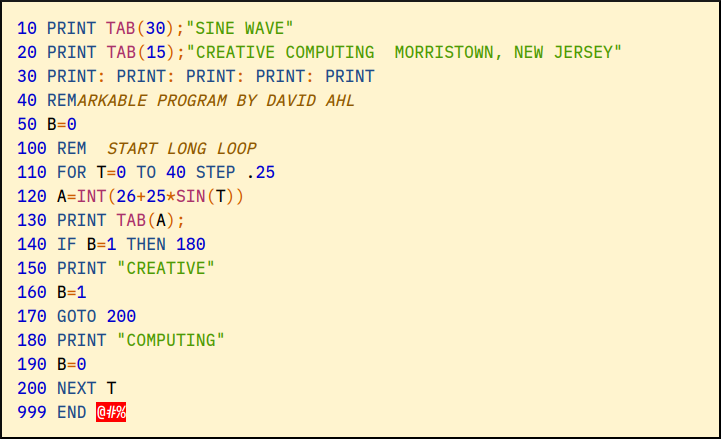
It is important to note that characters that are not part of a valid token are clearly highlighted in a different color than the other tokens that are valid (red in the example above).
Deliverables
The source file highlighter.clj must include the authors' personal information (student ID and name) at the top, within a comment. For example:
;----------------------------------------------------------
; Project: BASIC Lexical Highlighter
; Date: June 10, 2026.
; Authors:
;          A01770771 James Howlett
;          A01777771 Wade Wilson
;----------------------------------------------------------
Create a folder called highlighter. Place the following files in this folder:
highlighter.clj- Any external file that your program requires to function properly (e.g., HTML, CSS files, etc.).
-
The BASIC files (
.bas) used to validate the program’s functionality.
Create a file called highlighter.zip that contains the highlighter folder and all its contents.
Upload Instructions
To deliver the highlighter.zip file, please provide the following information:
Only one team member needs to upload the file.
Due date is Wednesday, June 10.
References
- Ahl, David. BASIC Computer Games: Microcomputer Edition.
Workman Pub Co., 1978.
— Source code for over one hundred games in BASIC: bcg.zip - Wikipedia: Syntax highlighting
- Wikipedia: BASIC